
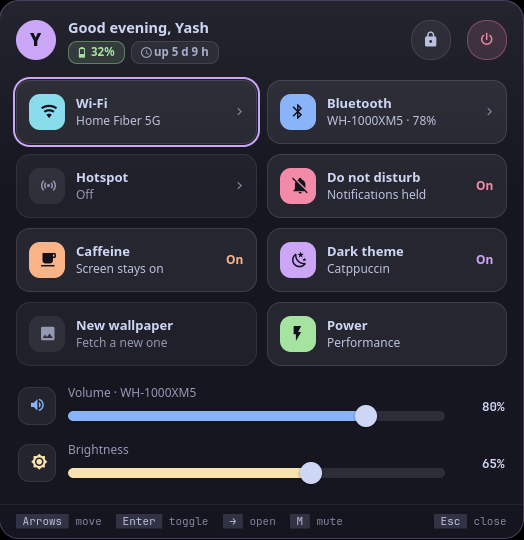
Kendra (केन्द्र) is Sanskrit for "centre": the centre every quick setting sits in.
kendra is quick settings for Vyom: one keyboard-driven panel that opens instantly, with live data, a preview and a key for everything. It runs on any compositor with the layer-shell protocol (sway, Hyprland, river, niri, Wayfire, labwc…). In Vayu, the desktop it was built for, it replaces the theme / wallpaper / jyoti (keep awake) capsules on the bar.
#Features
- A panel under the bar's top-right corner: your initial, a greeting, chips for the battery and uptime, and lock and power buttons set apart (power in red;
Space landSpace pdo the same). - Tiles: Wi‑Fi, Bluetooth, hotspot, do not disturb, jyoti (keeping the laptop awake), dark theme, new wallpaper, power profile. Every toggle writes On or Off, and an "on" tile fills its icon in the tile's colour, so you never guess from a faint tint.
- Wi‑Fi and Bluetooth name what they're on ("Home Fiber 5G", "WH-1000XM5 · 78%", with the headphones' battery), and
oopens their details: tarang and setu when they're installed, or your ownopencommand (Shift+Enter, a right click, or a click on the tile's>arrow too; a click anywhere else on the tile toggles it). - Volume and brightness sliders that show their value, a thick track and a big thumb; volume names the output device, and its icon button (or
m) mutes. - Vim keys (Vyom 0.7):
h/j/k/lmove,Entertoggles,Spaceis the leader and never toggles a tile,?lists every key. - A clear accent frame on the tile or slider you're on.
- Opens instantly with the last state, then refreshes every tile in the background; anything the machine doesn't have isn't shown.
- Any tile can be driven by your own commands (
status/toggle/on/off, matched withon_when). - A tile can have levels (Jyoti: Akhaṇḍa, Nandādīpa): while it's on, a row under the tiles picks one, and the tile's subtitle names it.
- Keyboard first: every action has a key, shown in the footer; the mouse works too.
- Never freezes the panel: slow commands run in the background.
#Install
#Requirements
- Vyom 0.6.0 or newer (Python 3.11+, PyGObject, GTK 4, gtk4-layer-shell, a Nerd Font)
- optional: nmcli, bluetoothctl, makoctl, gsettings, powerprofilesctl, wpctl, brightnessctl (each tile uses what's there)
#Install
git clone https://github.com/Theyashsawarkar/kendra ~/.local/share/vyom/plugins/kendra
vyom reload           # pick it up (or log out and in)
vyom kendra            # open it; run it again to close
Give it a key in your compositor, e.g. sway:
bindsym $mod+<key> exec vyom kendra#Update and uninstall
git -C ~/.local/share/vyom/plugins/kendra pull && vyom reload     # update
rm -rf ~/.local/share/vyom/plugins/kendra && vyom reload # uninstall#Usage
Open it with vyom kendra (or your key). It's always in NORMAL mode (there's nothing to type): h / j / k / l move through the tiles and down into the sliders, Enter toggles the focused tile, o opens its details, m mutes. On a slider h / l change it by 5 (a count first: 3l is +15) and 0 / $ go to its ends. Space never toggles a tile any more: it's the leader (Space l locks, Space p opens the power menu, Space g jumps to another panel, Space ? lists every key).
Vyom's vim keys work too: ? and Space ? list every key, Space Space is the palette, q closes, Esc steps back, Space u f is fullscreen, Space r refreshes; on a card j / k move between controls, h / l change the focused one and Enter presses it.
Keys (it's always in NORMAL mode: there's nothing to type)
| Key | Action |
|---|---|
h | Move left in the tiles (on a slider: lower it by 5) |
l | Move right in the tiles (on a slider: raise it by 5) |
j | Move down (from the tiles into the sliders) |
k | Move up |
g g | Jump to the first tile |
G | Jump to the last control (the bottom slider) |
0 | Set the focused slider to its minimum |
$ | Set the focused slider to its maximum |
Enter | Toggle the focused setting (on a slider: mute it) |
o | Open the focused tile's details (Wi-Fi in tarang, Bluetooth in setu) |
m | Toggle mute on the sound output |
Leader (Space)
| Key | Action |
|---|---|
Space l | Lock the screen |
Space p | Open the power menu |
Space g w | Open the Wi-Fi panel (tarang) |
Space g b | Open the Bluetooth panel (setu) |
Space g h | Open the hotspot (tarang's Hotspot tab) |
Space g p | Open the power menu (vishram) |
Space g a | Open the battery panel (urja) |
Space r | Reload every tile and slider |
Both
| Key | Action |
|---|---|
Shift+Enter | Open the focused setting's details (same as o) |
Keys that moved in this release still say where they went: L → Space l.
#Configuration
Everything is optional, in ~/.config/vyom/config.toml under [plugin.kendra]:
| Setting | Default | What it does |
|---|---|---|
tiles | wifi bluetooth hotspot dnd jyoti theme wallpaper power-profile | Which tiles, in order |
lock / power | loginctl lock-session / vishram | The header buttons (power: vishram inside Vyom when it's installed) |
tile.<name> | (none) | Per tile: open, status, on_when, toggle, on, off, subtitle_on/off, title, icon, icon_svg (a line-drawing SVG in currentColor), color, levels (below) (without open, Wi‑Fi and hotspot open tarang and Bluetooth setu, when installed) |
margin_top / margin_right | 6 / 8 | Position under the bar |
A tile with levels lists them under levels, each with a name, a when (a regex on the status output: this level is the current one) and a set command. While the tile is on, a row under the tiles shows a button per level, the current one filled in the tile's colour; click one (or move to it with j and press Enter) to switch. Clicking the tile itself still turns it on or off.
[plugin.kendra.tile.jyoti]
status = "~/.local/bin/jyoti-status.sh"
on_when = '"class":"(active|strong)"'
toggle = "~/.local/bin/jyoti-toggle.sh"
levels = [
  { name = "Akhaṇḍa", when = '"class":"active"', set = "~/.local/bin/jyoti-toggle.sh akhanda" },
  { name = "Nandādīpa", when = '"class":"strong"', set = "~/.local/bin/jyoti-toggle.sh nandadipa" },
]
Run vyom reload after editing.
#Troubleshooting
- Nothing opens.
vyom listshows every installed tool, and why one is skipped (a missing requirement, or a Vyom that's too old). - It opened, then something failed. Look for a
Tracebackin the daemon's log,journalctl --user -u vyom -u vyom-daemon -b(without systemd:~/.local/state/vyom/daemon.log), and open an issue with it. - No blur or rounded corners. That's the compositor: on SwayFX, add
layer_effects "vyom" { blur enable; corner_radius 20; shadows enable }.
#The Vyom family
Each tool is its own repository, so you install only the ones you want:
| Tool | What it does | |
|---|---|---|
| dvara | द्वार, gateway | The app launcher |
| ganit | गणित, mathematics | The calculator and converter |
| smriti | स्मृति, memory | Clipboard history |
| bhava | भाव, feeling, emotion | The emoji picker |
| tarang | तरंग, wave | Wi‑Fi and the hotspot |
| setu | सेतु, bridge | Bluetooth |
| doot | दूत, messenger | Your phone, through KDE Connect |
| patra | पात्र, vessel | Docker containers |
| akashvani | आकाशवाणी, voice from the sky | Notifications |
| raga | राग, melody | YouTube music and video |
| mudra | मुद्रा, gesture | Keybinding search |
| urja | ऊर्जा, energy | The battery at a glance |
| vishram | विश्राम, rest | The power menu |
| kendra (this one) | केन्द्र, centre | Quick settings |
#Contributing
Bug reports, ideas and pull requests are welcome: see CONTRIBUTING.md for the development setup and the few rules every tool follows, and CHANGELOG.md for what changed in each release. Please report security issues privately (SECURITY.md).
#License
MIT.